
Mastering dbt Materializations: Table, View, Incremental & Ephemeral Explained
In dbt (data build tool), materializations define how your SQL models are physically (or logically) built in your data warehouse. They control whether a model becomes a persisted table, a view, an incrementally updated table, or even just inlined code. Understanding materializations is crucial for performance, cost, maintainability, and correctness of your analytics pipelines.
In this article, we will cover:
- The concept of materializations and why dbt supports them
- The built-in types: table, view, incremental, ephemeral, and materialized view
- For each type, pros/cons, internal behavior, and 3 example programs
- A Merquine-style diagram / flow showing how materializations and dependencies relate
- Memory / interview / exam strategies
- Why mastering this is important
- Common pitfalls and best practices
Let’s dive in.
1. What Are Materializations?
Conceptual Definition
- A materialization in dbt is a strategy that describes how the SQL in a model (.sql file) should be turned into something in the database (table, view, or other).
- The SQL we write is a
SELECTstatement, but dbt wraps around that with logic (via macros) to create or update a database object. - The materialization controls when, how much, and where the model executes and persists results.
- You can override the materialization per model (via
{{ config(materialized='...') }}) or set defaults indbt_project.yml. - The default materialization if not overridden is
view(in many setups). ([phData][1]) - Materializations are implemented via macros in dbt’s internals, allowing you to customize or write custom materializations. ([Medium][2])
In simpler terms: the model’s SQL is your transformation logic, and the materialization is your deployment strategy for that logic in your warehouse.
Why Multiple Materializations?
Because different transformation patterns, data volumes, freshness needs, and performance trade-offs demand different strategies:
- Some models should always be fresh (views)
- Some are expensive to re-run and better persisted (tables)
- Some grow over time and only need incremental updates (incremental)
- Some are simple helper logic that should not clutter the warehouse (ephemeral)
- Some databases support materialized views, which combine query performance and freshness behavior
Choosing the right materialization for each model is a key design decision in dbt.
2. Built-in Materialization Types
Here are the core types you should know.
2.1 Table Materialization
Behavior & internals
- A model materialized as table is rebuilt fully — dbt generates a
CREATE TABLE AS SELECT ...(orDROP + CREATE, orCREATE OR REPLACE TABLE) on each run (unless certain config optimizes). - The result is stored persistently in the warehouse.
- Subsequent queries read from the stored table, not re-executing the transformation logic each time.
- This is efficient for models that are expensive to compute and are queried often (so reading performance matters). ([dbt Developer Hub][3])
- But rebuilding large tables can be expensive in time and compute, so not ideal for huge datasets unless incremental logic is used.
Pros / Cons
| Pros | Cons |
|---|---|
| Fast query performance (data precomputed) | Full rebuild cost on each run |
| Simpler logic (no incremental conditions) | High compute usage and possibly wasteful |
| Ideal when logic doesn’t change often | Potentially higher storage usage |
Example programs (3 distinct cases)
Example T1: Simple table
-- models/daily_sales_table.sql{{ config(materialized='table') }}
select  order_date::date as date,  count(*) as num_orders,  sum(amount) as total_amountfrom {{ ref('raw_orders') }}group by date
Every run rebuilds daily_sales_table.
Example T2: Partition-aware table creation
-- models/partitioned_events.sql{{ config(materialized='table', partition_by={'field': 'event_date', 'data_type': 'date'}) }}
select  user_id,  event_date,  event_type,  propertiesfrom {{ ref('raw_events') }}
You partition by event_date so queries on date ranges are faster, but still full rebuild each time.
Example T3: Snapshot-like table building
-- models/customer_status_history_table.sql{{ config(materialized='table') }}
with base as (  select    id,    status,    updated_at,    effective_from,    effective_to  from {{ ref('raw_customer_status') }})
select * from base
Here, you choose to rebuild the full history table occasionally, rather than incremental. (This is less common but sometimes acceptable for moderate sizing.)
2.2 View Materialization
Behavior & internals
- A model materialized as view becomes a database view:
CREATE OR REPLACE VIEW ... AS SELECT .... - It does not store data — it stores the query logic.
- Each time you query a view, the underlying transformation runs in real time. ([docs.paradime.io][4])
- dbt’s
dbt runensures the view definition is updated, but reading does not require a separate build step (besides compiling). - Because view logic is executed on read, views always reflect fresh input data (no staleness). ([materialize.com][5])
Pros / Cons
| Pros | Cons |
|---|---|
| Always fresh data | Querying can be slower (especially on complex logic) |
| Cheap builds (just replace view definition) | Complex transformations in nested views may be expensive |
| Minimal storage | Heavy query cost each time |
| Great for staging / lightweight transformations | Not ideal for heavy transformations or frequent use in BI |
Example programs (3 distinct cases)
Example V1: Simple view
-- models/stg_customers_view.sql{{ config(materialized='view') }}
select  id,  lower(trim(email)) as email_clean,  signup_datefrom {{ source('raw', 'customers') }}where active = true
A cleaned staging view of customers.
Example V2: Join underlying models
-- models/view_user_orders.sql{{ config(materialized='view') }}
select  u.id as user_id,  u.signup_date,  o.order_id,  o.order_date,  o.amountfrom {{ ref('stg_customers_view') }} uleft join {{ ref('raw_orders') }} o on u.id = o.customer_id
Because stg_customers_view is a view, the logic is nested.
Example V3: Parameter / flag conditional logic
-- models/view_active_sales.sql{% set date_limit = var('active_since', '2026-01-01') %}
{{ config(materialized='view') }}
select  c.id as customer_id,  sum(o.amount) as total_spentfrom {{ ref('raw_customers') }} cjoin {{ ref('raw_orders') }} o  on c.id = o.customer_idwhere o.order_date >= '{{ date_limit }}'::dategroup by c.id
You can parameterize filtering logic in a view.
2.3 Incremental Materialization
Behavior & internals
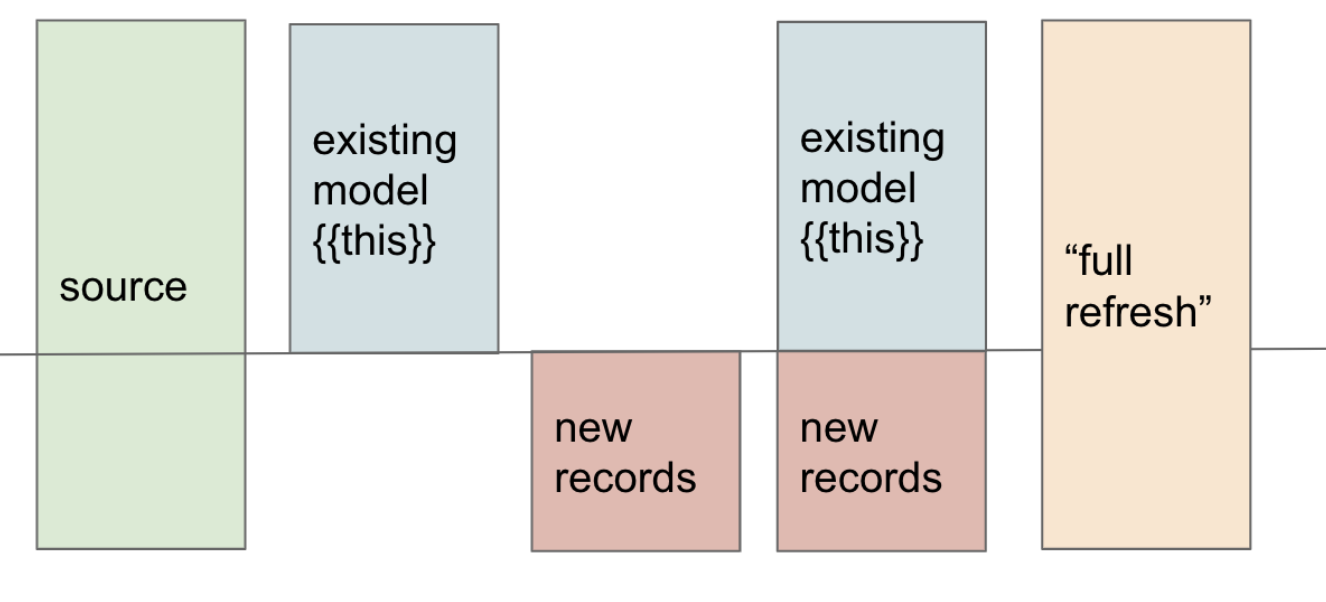
- An incremental model builds a table initially, and on subsequent runs only processes new or changed rows, merging them into the existing table. ([dbt Developer Hub][6])
- dbt supplies a macro
is_incremental()which is true when the table exists, when you’re not doing a--full-refresh, and when materialization is set to incremental. ([thedataschool.co.uk][7]) - In your model SQL, you often guard logic: if incremental, use only new rows; else (first run or full refresh), do full logic.
- You configure a
unique_keyto define how to identify duplicates or updates (so merge or upsert logic can apply). ([dbt Developer Hub][6]) - Some adapters support different incremental strategies, like
insert_overwrite,merge, etc. ([dbt Developer Hub][6])
Pros / Cons
| Pros | Cons |
|---|---|
| Efficient – only process new data | More complex logic required |
| Faster runs after initial build | Risk of logic drift / bugs in merge logic |
| Good for event data / append patterns | Doesn’t handle large backfills easily unless full refreshes |
| Less computing cost on incremental refresh | Must track change keys or updated timestamps |
Example programs (3 distinct cases)
Example I1: Simple incremental
-- models/incremental_events.sql{{ config(materialized='incremental', unique_key='event_id') }}
select  event_id,  user_id,  event_type,  event_timefrom {{ ref('raw_events') }}{% if is_incremental() %}  where event_time > (select max(event_time) from {{ this }}){% endif %}
On first run, builds full table; thereafter only new events.
Example I2: Merge / upsert logic (Postgres style)
-- models/incremental_customers.sql{{ config(materialized='incremental', unique_key='id') }}
with new_data as (  select id, name, last_update  from {{ ref('raw_customers') }}  where last_update > (select max(last_update) from {{ this }}))
, merged as (  select    new_data.*,    existing.other_col  from new_data  left join {{ this }} existing on existing.id = new_data.id)
select * from merged
This pattern ensures updated rows replace older ones.
Example I3: Partitioned incremental
-- models/incremental_partitioned_sales.sql{{ config(materialized='incremental', unique_key='order_id', partition_by={'field':'order_date', 'data_type':'date'}) }}
select  order_id,  order_date,  amountfrom {{ ref('raw_orders') }}{% if is_incremental() %}  where order_date > (select max(order_date) from {{ this }}){% endif %}
You partition by order_date but still incrementally add newer partitions.
2.4 Ephemeral Materialization
Behavior & internals
- An ephemeral model is not built as a table or view. Instead, when a downstream model references it via
ref(), dbt inlines its SQL as a CTE (common table expression) into the consuming model. ([dbt Developer Hub][6]) - You cannot query an ephemeral model directly in the warehouse — it has no physical representation. ([dbt Developer Hub][6])
- However, ephemeral models allow modularization and reuse of logic without cluttering your database objects.
- Ephemeral models don’t support incremental logic (i.e.
is_incremental()will always be false). ([dbt Community Forum][8])
Pros / Cons
| Pros | Cons |
|---|---|
| Keeps warehouse clean (no extra tables) | Logic is always executed inline – no reuse in isolation |
| Great for small, reusable logic fragments | Harder to debug in complex nesting |
| Low overhead | No direct querying or testing as standalone object |
Example programs (3 distinct cases)
Example E1: Clean user attributes
-- models/ephemeral_clean_users.sql{{ config(materialized='ephemeral') }}
select  id,  lower(trim(email)) as email_clean,  coalesce(name, 'unknown') as name_cleanfrom {{ ref('raw_users') }}
Example E2: Filter & join helper
-- models/ephemeral_active_orders.sql{{ config(materialized='ephemeral') }}
select  o.order_id,  o.user_id,  u.email_cleanfrom {{ ref('raw_orders') }} ojoin {{ ref('ephemeral_clean_users') }} u on u.id = o.user_idwhere o.status = 'completed'
Here ephemeral_clean_users will inline its query before join.
Example E3: Reusable metric fragment
-- models/ephemeral_user_spend_fragment.sql{{ config(materialized='ephemeral') }}
select  user_id,  sum(amount) as spend_sumfrom {{ ref('orders') }}group by user_id
Then:
-- models/final_user_metrics.sql{{ config(materialized='table') }}
with spend as (  select * from {{ ref('ephemeral_user_spend_fragment') }})select  u.id as user_id,  u.signup_date,  spend_sumfrom {{ ref('stg_users') }} uleft join spend on spend.user_id = u.id
This separates logic but doesn’t create extra tables.
2.5 Materialized View (Hybrid) [Optional / Advanced]
Some databases support materialized views (a cached snapshot of a view). dbt includes support for materialized_view in compliant adapters. ([dbt Developer Hub][6])
Behavior & internals
- A materialized view stores the result of a query but can be refreshed (automatically or manually).
- It acts like a table in reading speed but like a view in being re-derived or refreshed.
- In dbt,
materialized_viewis treated similarly to views in terms of dbt run triggering definition changes, but behaves like incremental for data refresh in the database. ([dbt Developer Hub][6]) - You can configure
on_configuration_changeto control whether dbt recreates or updates existing objects on config changes. ([dbt Developer Hub][6])
Pros / Cons
| Pros | Cons |
|---|---|
| Combines speed of table with flexibility of view | Not supported on all warehouses |
| Lesser query cost | Refresh logic must be managed or scheduled |
| Good middle ground for many use cases | Complexity of underlying database support |
Example programs (3 distinct cases)
Example M1: Simple materialized view
-- models/mv_customer_summary.sql{{ config(materialized='materialized_view') }}
select  customer_id,  count(*) as order_count,  sum(amount) as total_revenuefrom {{ ref('raw_orders') }}group by customer_id
Example M2: Materialized view with refresh policy
-- models/mv_recent_events.sql{{ config(materialized='materialized_view', on_configuration_change='apply') }}
select  event_type,  count(*) as cntfrom {{ ref('raw_events') }}where event_date >= current_date - 7group by event_type
This view is scheduled or auto-refreshed weekly.
Example M3: Partitioned materialized view (if database supports)
-- models/mv_partitioned_sales_mv.sql{{ config(materialized='materialized_view') }}
select  date_trunc('month', order_date) as month,  sum(amount) as monthly_revenuefrom {{ ref('raw_orders') }}group by 1
This partitions by month and caches snapshot results, refreshing when underlying data changes.
3. Merquine-Style Diagram / Flow of Materializations
Below is a conceptual diagram showing how models, materializations, and dependencies relate in a dbt project.

(Textual flow representation:)
raw / source tables    ↓staging / cleanup models (often view or ephemeral)    ↓intermediate / enriched models (table / incremental / view)    ↓final mart models (table / incremental / materialized view)    ↓BI / dashboards
During compile → dbt resolves materializations → build order from dependency graph (via ref()) → execute SQL in warehouse using appropriate strategy
You can imagine a layered DAG: early layers might use ephemeral or view, later heavy layers might use table or incremental, and optionally a materialized view in between.
At compile time, dbt resolves Jinja, merges macros, and wraps the logic in a materialization wrapper for each model. The dependency graph ensures models are built in correct order.
4. Memory / Interview / Exam Tips
Here are strategies to remember and explain materializations effectively.
Mnemonics & frameworks
- “VITE” — View, Incremental, Table, Ephemeral
- Or “TIVE” (same letters)
- Or remember “VITE is alive” (a little phrase): View, Incremental, Table, Ephemeral
Also think:
- View: virtual / always fresh
- Table: solid / rebuild
- Incremental: evolving / partial updates
- Ephemeral: invisible / inlined
Flashcards
- Q: What does
{{ config(materialized='...') }}do? A: It tells dbt how to build the model (table, view, incremental, etc.). - Q: What happens when
is_incremental()is true vs false? A: If true, you run incremental logic; if false (first run or full refresh), you run full logic. - Q: When is ephemeral appropriate? A: When you want to reuse logic but avoid creating separate database objects.
- Q: What is the default materialization if none is specified?
A:
view(in many configurations) ([dbt Developer Hub][3])
Whiteboard / verbal explanation
-
Sketch the four types in a 2×2 grid:
Stored? | Yes | No--------- | --------------- | --------------Rebuilt? | Table | Ephemeral (inlined)On read? | Materialized view / incremental | View (virtual) -
Walk through behavior of each type: what happens on first run, subsequent run, query time.
-
During interview, explain with sample data:
“Suppose I have a table of events. If I run incremental, on the first run it’s full, then only new events get processed. If I used a view, each query regenerates the logic. If I used an ephemeral helper model, it’d be inlined in downstream queries.”
Comparison & trade-offs discussion
Being ready to articulate trade-offs is key in interviews:
- When would you choose table vs incremental?
- Why not always use view?
- What are the dangers of ephemeral?
- In which databases is materialized view supported or not?
Practice diagnosing models
Given a model name and usage scenario, decide which materialization to use and justify:
- A heavy join used frequently → table or incremental
- A small staging cleanup → view
- A reusable logic used in only one downstream → ephemeral
- A business metric refreshed nightly → materialized view (if supported)
Use these scenarios to practice.
5. Why It Matters (Importance)
Understanding materializations is fundamental for these reasons:
- Performance: Query speed and build speed hinge on the right materialization. A poorly chosen view may slow BI queries; an overused table rebuild may waste compute.
- Cost control: Especially in cloud warehouses, compute cost is expensive; incremental or selective table builds reduce cost.
- Scalability: As data grows, full table rebuilds may become infeasible — incremental logic is necessary.
- Maintainability & readability: Using ephemeral models or views helps break logic into modular, testable parts without cluttering the warehouse.
- Flexibility / trade-offs: You need to understand trade-offs to design robust pipelines, especially when different models have different needs.
- Correctness & data freshness: Some data must always be fresh; some is okay with lag — materialization lets you control that.
- Adapter / database capabilities: Some warehouses support materialized views, others don’t — knowing materialization allows you to adapt model design accordingly.
In sum, mastering materializations means your dbt pipelines will be faster, more cost-efficient, and more reliable.
6. Common Pitfalls & Best Practices
| Pitfall / Mistake | Explanation | How to Avoid / Mitigate |
|---|---|---|
| Full rebuilds for large tables too frequently | Rebuilding huge tables every run is expensive | Use incremental when possible, or limit rebuilds to off-peak windows |
Forgetting is_incremental() guard | Without guard logic, incremental models act like full-table every time | Always wrap new/changed logic inside guard if is_incremental() |
| Overusing ephemeral models | Inlining too much logic can make SQL bulky & hard to debug | Use ephemeral for small fragments, not heavy transformations |
| Nested heavy views | Stacking many views with deep logic leads to very slow queries | Materialize heavy layers into tables or incremental |
| Using unsupported materialized views | Some warehouses don’t support materialized views | Check adapter support before using materialized_view ([dbt Developer Hub][6]) |
Not using unique_key or update logic correctly | Leads to duplicate rows or stale data in incremental models | Always configure unique_key and merge/upsert logic carefully |
| Not doing full refresh occasionally | Over time, incremental logic might diverge | Periodically run --full-refresh to rebuild tables from scratch |
| Ignoring compile output | Jinja or configs might compile to unexpected SQL | Use dbt compile to inspect generated SQL and validate behavior |
7. Summary & Next Steps
- Materializations are the strategies by which dbt executes your SQL models into something in your warehouse (table, view, etc.).
- The main built-in types are table, view, incremental, ephemeral, and sometimes materialized view (depending on the adapter).
- Each has trade-offs: cost, performance, freshness, complexity.
- Use table when stability and read speed matter; view for freshness and simplicity; incremental for large, growing data; ephemeral for modular logic without clutter; materialized views as hybrid when supported.
- Always guard incremental logic, and inspect compile output.
- In interviews and exams, you can explain behavior, trade-offs, and choose appropriate types based on use case.