
dbt Incremental Models
In data pipelines, especially in analytics, raw datasets often grow every day. If you naively rebuild your entire dataset (or model) from scratch every time you run your pipeline, you waste time, compute, and warehouse resources. That’s where incremental models in dbt come in: they allow you to process only the new or changed rows since the last run, rather than reprocessing the entire dataset.
In dbt, an incremental model is a variation of the table materialization where you include logic to append or merge new data, rather than rebuilding everything. It uses the built-in macro is_incremental() to detect when we should apply incremental logic. The first run is always a “full load” (i.e. build everything). Subsequent runs (if not forced full refresh) use incremental filters to only act upon delta data. ([dbt Developer Hub][1])
In this article I’ll cover:
- The fundamentals: how incremental models work under the hood
- Key configuration and strategies (unique_key, filtering, incremental_strategy)
- Three example programs (SQL model files) covering various use cases
- A Merquine-style diagram / flow showing lifecycle and dependencies
- Memory / exam / interview preparation techniques
- Why incremental models are vital in real projects
- Common pitfalls, best practices, and trade-offs
Let’s begin with internal mechanics.
1. How dbt Incremental Models Work
Lifecycle & Mechanics
When you designate a model as incremental, dbt alternates between two modes:
- Full load: If the model’s target table does not yet exist in the warehouse, or if you run with
--full-refresh, or if the model is misconfigured, dbt will run the full query logic and create or replace the table. - Incremental load: In subsequent runs (when the table exists and you’re not doing full refresh), dbt runs your SQL with additional filtering logic (inside an
if is_incremental()block) to only capture new or changed rows, then append or merge them into the existing table. ([dbt Developer Hub][1])
The is_incremental() macro returns true only under conditions:
- The target table (model) already exists in the warehouse
- The model is configured with
materialized='incremental' - You are not running with
--full-refresh
If any of those is false, is_incremental() is false, and the model runs its “full logic” branch. ([dbt Developer Hub][1])
In your SQL, you typically write:
{{ config(materialized='incremental', unique_key='some_id') }}
select  ...from {{ ref('upstream_source') }}{% if is_incremental() %}  where <filter_condition_using {{ this }}>{% endif %}
Here, {{ this }} refers to the existing target table. Using that, you can compare timestamps or IDs. ([dbt Developer Hub][2])
Key Ingredients: Filtering + Unique Keys
To make incremental logic safe and correct, you need:
- A filter condition in the
is_incremental()branch that isolates new or updated rows—often by comparing a timestamp or version column to the maximum in existing table. - A unique_key configuration (optional but highly recommended) that tells dbt how to identify duplicates or updates (so you can do merging or upserts if needed). ([dbt Developer Hub][1])
- Optionally, you may choose different incremental strategies (e.g.
merge,append,insert_overwrite,microbatch) depending on your warehouse capabilities. ([dbt Developer Hub][3])
The incremental strategy influences how dbt applies the delta data: e.g. some warehouses support atomic MERGE statements; others implement a DELETE + INSERT. ([dbt Developer Hub][4])
Summary of behavior
- First run: Full load (create the table)
- Subsequent runs: Incremental load only if
is_incremental()is true - If full-refresh flag or table absent: do full load again
- Changes in schema: may require full refresh or careful management
Incremental models thus provide a balance: parts of your data are computed persistently (like a table), but you avoid wasteful full recomputation each run.
2. Configuration & Strategies
Basic Configuration
In your model file, you configure like this:
{{ config(    materialized = 'incremental',    unique_key = 'id') }}
select ...from upstream{% if is_incremental() %}  where <filter logic>{% endif %}
You must ensure the SQL is valid both with and without the is_incremental() clause. That is, the “base query” (outside the if) must work even when executed as a full load.
Filtering logic patterns
Common filtering techniques:
- Timestamp comparison:
where updated_at > (select max(updated_at) from {{ this }}) - Date partition filter: e.g.
where event_date >= (select max(event_date) from {{ this }}) - Combining new + updated: filter on both
created_atandupdated_atcolumns if data can change.
You must ensure there are no gaps or missing updates — your filter should be inclusive enough to cover late arrivals or small backfills.
Unique key & merge logic
- The
unique_keyconfig tells dbt how to merge or deduplicate when new rows may conflict with existing ones. - Without a
unique_key, dbt may simply append rows, leading to duplicates (append-only). Some strategies (append) do not enforce unique keys. ([docs.paradime.io][5]) - With
mergestrategy and a unique key, dbt can do an atomic merge — updating existing records and inserting new ones. - For warehouses or adapters that don’t support
merge, dbt may simulate viadelete + insert.
Incremental strategies
Some strategies available in dbt:
- append (append-only): easiest, just append new rows, no updates. Works when historical data doesn’t change. ([docs.paradime.io][5])
- merge: update or insert logic; new rows + updates. Requires support from warehouse.
- insert_overwrite: overwrite partitions or full table segments (used in BigQuery or partitioned tables)
- microbatch: process in batches over time windows for very large datasets (especially time-series) ([dbt Developer Hub][3])
Which you choose depends on:
- Your warehouse’s capabilities
- The nature of your data (immutable event logs vs dimensions that update)
- Your tolerance for complexity vs performance
Full-refresh and schema changes
- You can force a full rebuild with
dbt run --full-refresh - If upstream schema changes (e.g. new column), you may need to handle
on_schema_changebehavior in config, or trigger a full refresh - Be careful about schema drift in incremental models — new columns or changed types may not propagate unless explicitly handled
3. Example Programs (SQL Models) for Incremental Patterns
Below are 3 unique example scenarios, each with example SQL model files illustrating different use cases of incremental logic.
Example Set 1: Simple event ingestion (append-only)
Example 1A: incremental_events_append.sql
{{ config(    materialized = 'incremental',    unique_key = 'event_id',    incremental_strategy = 'append') }}
select event_id, user_id, event_type, event_tsfrom {{ ref('raw_events') }}{% if is_incremental() %} where event_ts > (select coalesce(max(event_ts), '1900-01-01') from {{ this }}){% endif %}- This is an append-only model: new events are added.
- Because we use
incremental_strategy = 'append', existing rows are not updated. - Good for event logs / time-series where historical rows never change.
Example 1B: incremental_page_views.sql
{{ config(    materialized = 'incremental',    unique_key = 'view_id') }}
with clean as ( select view_id, user_id, view_ts, page_url from {{ ref('raw_page_views') }})select * from clean{% if is_incremental() %} where view_ts > (select max(view_ts) from {{ this }}){% endif %}- No explicit strategy: by default dbt may use merge or insert logic depending on adapter.
- Existing rows are unaffected; new ones get appended.
Example 1C: incremental_logs for JSON parsing
{{ config(    materialized = 'incremental',    unique_key = 'log_id') }}
with parsed as ( select (value_json->>'log_id')::int as log_id, (value_json->>'user') as username, (value_json->>'action') as action, ingest_ts from {{ ref('raw_logs') }}, lateral flatten(input => raw_logs.json_value) as value_json)select * from parsed{% if is_incremental() %} where ingest_ts > (select max(ingest_ts) from {{ this }}){% endif %}- This scenario is similar to logs ingestion; we filter on ingestion timestamp.
- New logs get appended; no updates to older logs.
Example Set 2: Merging dimension updates (updates + inserts)
Example 2A: incremental_customers_merge.sql
{{ config(    materialized = 'incremental',    unique_key = 'customer_id',    incremental_strategy = 'merge') }}
with base as ( select customer_id, name, email, updated_at from {{ ref('raw_customers') }})select * from base{% if is_incremental() %} where updated_at > (select max(updated_at) from {{ this }}){% endif %}- Using
merge, new customers are inserted, existing ones updated based oncustomer_id. - The
updated_atcolumn dictates which rows changed.
Example 2B: incremental_products_merge_updates.sql
{{ config(    materialized = 'incremental',    unique_key = 'product_id',    incremental_strategy = 'merge') }}
with prod as ( select product_id, category, price, last_modified from {{ ref('raw_products') }})select * from prod{% if is_incremental() %} where last_modified > (select max(last_modified) from {{ this }}){% endif %}- New products added; products whose
last_modifiedexceeds existing max get updates.
Example 2C: incremental_orders_merge.sql
{{ config(    materialized = 'incremental',    unique_key = 'order_id',    incremental_strategy = 'merge') }}
with ord as ( select order_id, customer_id, status, total, updated_at from {{ ref('raw_orders') }})select * from ord{% if is_incremental() %} where updated_at > (select max(updated_at) from {{ this }}){% endif %}- Useful when order status or totals may change over time (e.g. order upgraded, canceled, refunded).
Example Set 3: Partitioned / time window incremental / microbatch
Example 3A: incremental_sales_partitioned.sql
{{ config(    materialized = 'incremental',    unique_key = 'sale_id',    partition_by = {'field':'sale_date', 'data_type':'date'}) }}
select sale_id, product_id, sale_date, amountfrom {{ ref('raw_sales') }}{% if is_incremental() %} where sale_date > (select max(sale_date) from {{ this }}){% endif %}- Partitioned by
sale_date. - Only new dates beyond max seen sale_date are appended.
Example 3B: incremental_events_windowed.sql
{{ config(    materialized = 'incremental',    unique_key = 'event_id',    incremental_strategy = 'merge') }}
with events as ( select event_id, user_id, event_time, properties from {{ ref('raw_events') }})select * from events{% if is_incremental() %} where event_time >= (select dateadd(day, -1, max(event_time)) from {{ this }}){% endif %}- To catch late-arriving events or minor lag, we filter for events from
max(event_time) - 1 day, giving overlapping window so missing updates are captured.
Example 3C: microbatch incremental (if supported)
{{ config(    materialized = 'incremental',    unique_key = 'session_id',    incremental_strategy = 'microbatch',    incremental_predicates = ["session_start >= timestampadd(day, -7, current_timestamp)"]) }}
select session_id, user_id, session_start, session_endfrom {{ ref('raw_sessions') }}{% if is_incremental() %} where session_start > (select max(session_start) from {{ this }}){% endif %}- This uses microbatch strategy and
incremental_predicatesto chunk loads. - Good for very large datasets where you want to break incremental runs into smaller time windows. ([dbt Developer Hub][3])
4. Merquine-Style Flow / Diagram for Incremental Models
Here’s a conceptual flow describing how incremental models fit in dbt’s pipeline:
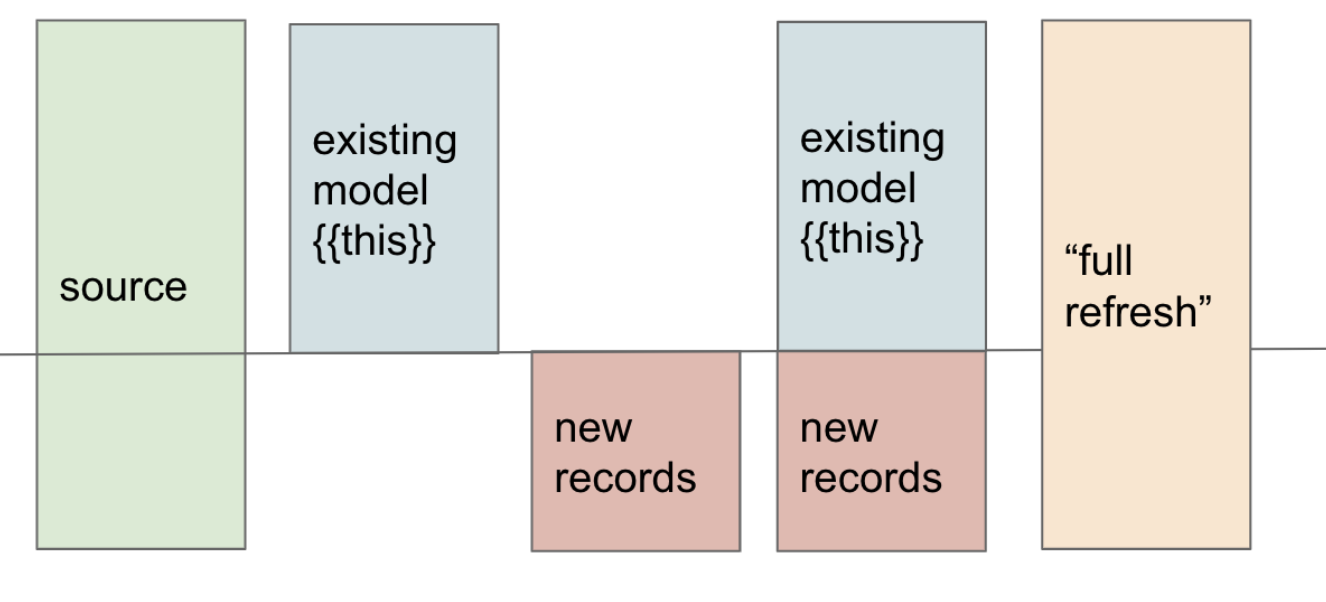
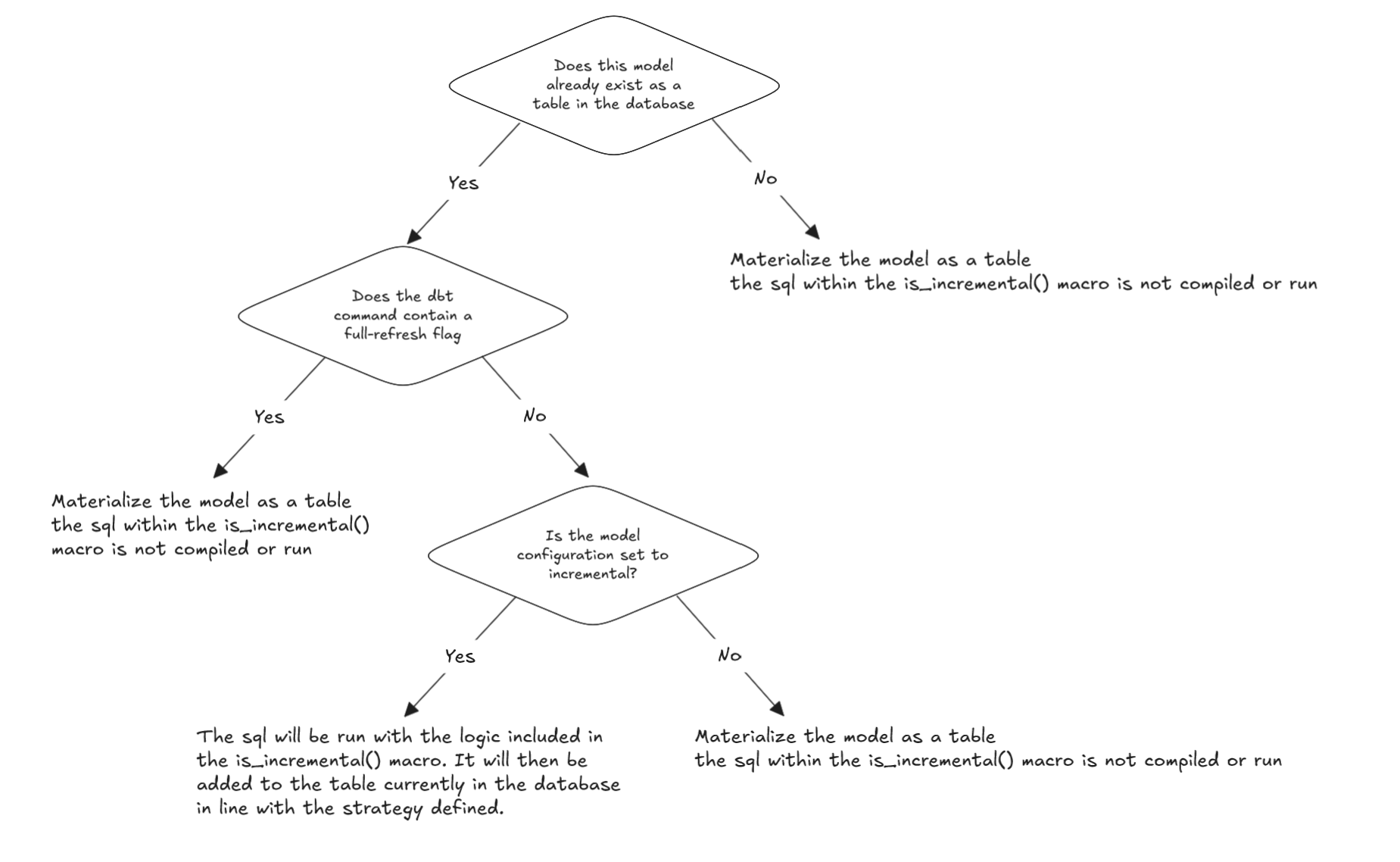

Textual representation:
raw / source tables │ ▼dbt compile (resolves SQL, macros, config) │for each incremental model: ├─ check: does target table exist? │ │ │ └─ No → full load (build entire table) │ ├─ else if full-refresh flag? → full load │ └─ else: ▸ is_incremental() = true ▸ filter source for new / changed rows ▸ apply incremental strategy (merge / append / microbatch) ▸ upsert / insert into existing table │ ▼execute incremental SQL in warehouse │ ▼new rows inserted / updated │ ▼full lineage graph, tests, documentation, next models runIn a larger DAG, incremental models sit between downstream models: the next models refer to them via ref(), so they benefit from fresh but efficient incremental updates.
5. Memory / Interview / Exam Preparation Tips
Here are strategies to remember, explain, and master incremental models.
Mnemonics & Key Terms
- “FIRA” — Full, Incremental, Refresh, Append/Merge
- “I is incremental” —
is_incremental()macro determines branch - “Delta logic + unique key = merge safety” — filtering + key = safe updates
Flashcards / Q&A
- Q: What conditions make
is_incremental()return true? A: Table exists + materialized isincremental+ not--full-refresh. - Q: What is the role of
unique_keyin incremental models? A: It defines how to identify duplicates or updates so dbt can merge them. - Q: When would you choose
appendvsmergestrategy? A: Useappendwhen historical data is immutable;mergewhen updates are expected. - Q: What is microbatch incremental? A: A strategy to break large time-series incremental loads into smaller time windows.
Whiteboard / verbal explanation
- Sketch a timeline, showing first run ingesting all history, then subsequent runs ingesting only new days.
- Walk through a sample model’s logic: show base query, then the
if is_incremental()branch, filter clause, merging/appending. - Compare two paths: full-refresh vs incremental.
- Explain trade-offs by scenario: “if I have 100 million rows, it’s wasteful to rebuild daily — incremental saves time and cost.”
Interview narrative
In an interview, you could answer:
“In dbt, an incremental model lets you process only the delta data rather than rebuilding the entire table. You use
{{ config(materialized='incremental') }}and wrap logic insideif is_incremental()to filter new or updated rows. You also configure aunique_keyand optionally an incremental strategy likemergeto safely upsert. If the target table doesn’t exist or you use--full-refresh, dbt falls back to full load. Incremental models are essential for scaling pipelines, reducing compute cost, and speeding deployments.”
Be prepared to discuss trade-offs: what happens with schema changes, how to catch late-arriving data, deduplication, etc.
6. Why Incremental Models Are Important (Real-World Value)
Incremental models matter not just as a theoretical feature — they are essential in production data systems. Here’s why:
-
Performance and speed When datasets grow to millions or billions of rows, rebuilding everything takes too long. Incremental models let you run fast daily (or hourly) updates by processing small deltas. ([dbt Developer Hub][4])
-
Cost efficiency Cloud warehouses charge by compute usage. Running full-table transformations repeatedly is costly. Incremental logic reduces compute consumption dramatically. ([dbt Developer Hub][1])
-
Scalability As your project and number of models grow, you’ll need efficient pipelines. Incremental models support growth by avoiding frequent large-scale rebuilds.
-
Timeliness & freshness You can update your downstream analytics more frequently because incremental runs are faster, enabling near real-time insights.
-
Flexibility & control You decide how much data to process, which updates to include, how to merge, how to handle late arrivals, schema changes, etc.
-
Reduced risk Because incremental runs are smaller, errors or performance regressions surface faster; you’re less likely to crash entire pipeline builds.
In sum, incremental models enable real-world data engineering at scale, balancing correctness, speed, cost, and maintainability.
7. Pitfalls, Trade-offs, & Best Practices
No tool is magic — here are common pitfalls and how to mitigate them.
Pitfalls & Issues
| Pitfall | Description | Mitigation / Best Practice |
|---|---|---|
| Incomplete filtering logic | If your where clause misses some records (e.g., late arrivals), you may lose updates or data gaps | Add buffer (e.g. subtract a day), or reprocess overlapping window |
| No unique_key | Without unique key, duplicates may accumulate | Always supply a reliable unique_key when updates are possible |
| Schema changes not reflected | If upstream adds columns or changes types, incremental logic may not pick these | Use --full-refresh or config on_schema_change when supported |
| Overlapping runs causing duplicates | If runs overlap in timing, duplicate or conflicting rows may arise | Use transactional merge or careful window logic |
| Performance degrade over time | Table size grows big; incremental insert or merge slows | Periodically vacuum, compact, or do full rebuilds |
| Testing incremental logic is harder | Because only small delta runs, mistakes in filter logic may go unnoticed | Use dbt compile to inspect generated SQL; test with small datasets or run full-refresh to validate |
| Adapter limitations | Some warehouses don’t fully support merge, or incremental in partitioned tables | Choose strategy supported by your adapter; consult docs for merge, insert_overwrite, etc. ([dbt Developer Hub][3]) |
Best practices
- Always write SQL valid in both incremental and full modes
- Guard filtering logic inside
is_incremental() - Use
coalesceor defaults in casethisis empty - Include buffer / overlap window logic for late data
- Schedule occasional full-refresh runs
- Monitor table health (size, fragmentation, growth)
- Document incremental assumptions
- Be cautious during schema changes: plan migrations carefully
- Inspect compiled SQL (
dbt compile) to validate filter / merge logic
8. Summary & Next Steps
- Incremental models in dbt allow you to process only new or changed rows each run, instead of full rebuilds.
- They rely on the
is_incremental()macro, plus filter logic and optionally aunique_keyto ensure safe merging/deduplication. - You must handle both full-load mode (for first run or forced refresh) and incremental mode in a single SQL file.
- Strategies like
merge,append,insert_overwrite, andmicrobatchprovide flexibility depending on data patterns and warehouse capabilities. - Real-world data systems benefit hugely from incremental models in terms of performance, cost, scalability, and timeliness.
- Be aware of pitfalls: incorrect filtering, schema drift, duplicates, adapter limitations.
- For exam or interview prep: memorize core conditions for
is_incremental(), trade-off reasoning, and walk through example models.